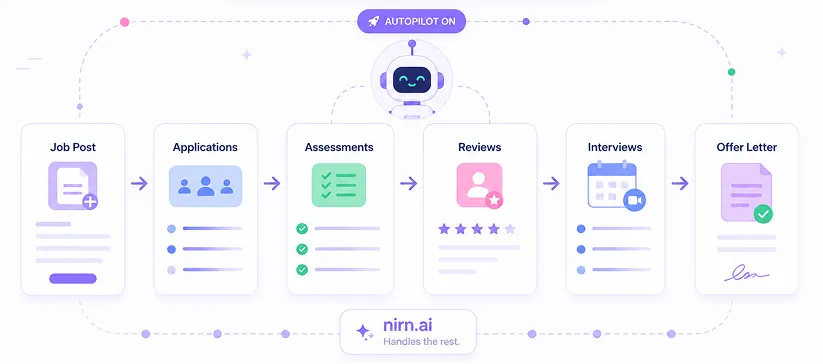
From job post to offer letter, on autopilot.
Create jobs, build visual hiring pipelines, and let candidates flow through assessments, reviews, and interviews automatically. You focus on talent. nirn.ai handles the rest.
Why workflows matter
Most hiring teams cobble together spreadsheets, email threads, and calendar links to move candidates through their process. Every handoff is a chance for someone to fall through the cracks: a follow-up missed, a score lost, a candidate ghosted.
nirn.ai workflows replace all of that with a single visual pipeline. Define your stages once, set your pass/fail thresholds, and the system handles progression, scheduling, and notifications automatically. Every transition is logged, every decision is traceable.
At a glance
- Stage Types
- 5
- Workflow Templates
- 3
- Calendar Providers
- 2
- Booking Modes
- 2
Visual Pipeline Builder
Design your hiring process visually.
Drag-and-drop stages, set pass/fail thresholds, and let the system route candidates automatically. No code required.
Assessment
Auto-scored evaluations
Booking
Calendar-integrated scheduling
Manual Review
Human decision gates
Notification
Automated email alerts
Status
Terminal outcomes
Jobs & Pipeline
One place for every open role.
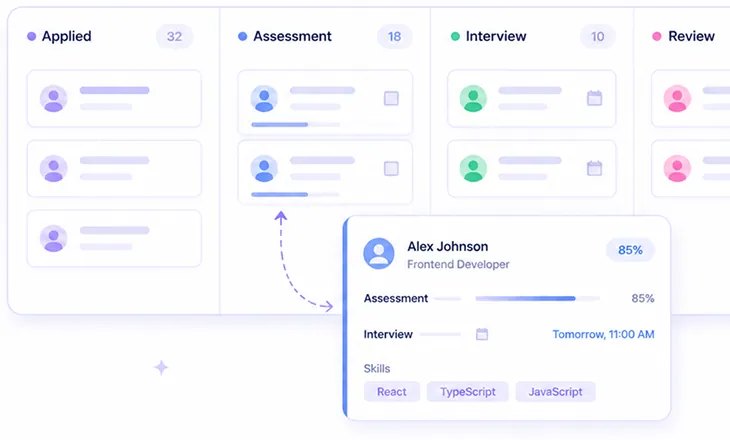
Create a job, attach assessments and workflows, and track every candidate from application to decision on a visual Kanban board.
A Job in nirn.ai is the single source of truth for a role. It ties together the job description, linked assessments, the hiring workflow, and every candidate in the pipeline. No more cross-referencing spreadsheets to figure out where someone stands.
The Kanban board gives your team a real-time view of candidate distribution across stages. Drag-and-drop to manually override automation when you need to. Every movement, automated or manual, is logged with a full audit trail.
Pipeline capabilities
Job Dashboard
Create and manage roles with status lifecycle: Open, On Hold, Closed, Filled, or Cancelled.
Kanban Board
Visual pipeline with drag-and-drop. See every candidate at every stage in real time.
Source Tracking
Know how candidates enter your pipeline: Applied, Sourced, Referred, or Imported.
Team Assignments
Assign hiring managers, reviewers, and interviewers per job with role-based access.
Calendar & Scheduling
Interviews schedule themselves.
Connect Google Calendar or Microsoft Outlook, and let the system handle availability checking, event creation, and meeting links.
How it works
| Feature | Description |
|---|---|
Calendar Connection | |
| Google Calendar | OAuth connection with Google Meet link generation |
| Microsoft Outlook | Microsoft Graph API with Teams link generation |
Booking Modes | |
| Auto-Book | System checks interviewer availability and books the first available slot automatically |
| Candidate Self-Select | Candidates receive a branded booking page and choose from available time slots |
Configuration | |
| Working Hours | Set business hours, buffer times between meetings, and advance booking windows |
| Booking Lifecycle | Full status tracking: Pending, Confirmed, Completed, No-Show, Cancelled, Rescheduled |
